gst-struct-viewer: Visualize GStreamer Structures Online
A simple, free online tool to parse and visualize complex GStreamer structure strings
Working with GStreamer can be challenging when you need to understand the structure of complex GST_STRUCTURE objects. Whether you’re debugging pipeline configurations, analyzing media properties, or working with GStreamer applications, parsing these hierarchical structures manually is tedious and error-prone.
Together with my copilot, I’ve created gst-struct-viewer, a lightweight, browser-based tool that makes it easy to visualize and explore complex GStreamer structures with a single click.
The Problem
GStreamer uses GST_STRUCTURE objects to represent structured data—capabilities, properties, events, messages, and more. When serialized to strings for logging, debugging, or transport, they can look surprisingly complex.
Here’s a simple example:
video/x-raw, format=(string)I420, width=(int)1920, height=(int)1080, framerate=(fraction)30/1
More complex structures may look like this:
stats, source=(structure)[stats, num-packets=(guint64)5120, num-bytes=(guint64)7340032, bitrate-bps=(guint64)2800000, \
    type=(IngestSourceType)network, state=(ConnectionState)connected, ingress=(structure)[stats, \
	session=(structure)< [sessionStats, reconnects=(uint)0, attempts=(uint)1, protocol=(string)udp, mode=(string)unicast, \
	handshake-state=(string)complete, endpoint-id=(string)"edge-a1", tags=(string)"region=west,priority=high", \
	links=(structure)< [linkStats, loss-rate=(double)0.0002, jitter-ms=(double)0.41000000000000003, rtt-ms=(double)1.72, \
	local-port=(int)51000, remote-port=(int)5000, local-address=(string)192.168.10.21, remote-address=(string)192.168.10.42, \
	encryption=(string)aes-gcm, auth-state=(string)verified, link-state=(string)running, transport=(structure)[transportStats, \
	mtu-bytes=(int)1400, rx-pps=(double)3100.25, tx-pps=(double)2998.75, rx-retrans=(guint64)12, tx-retrans=(guint64)8, \
	rx-dropped=(guint64)2, tx-dropped=(guint64)0, rx-queue-bytes=(guint64)65536, tx-queue-bytes=(guint64)32768, congestion-window=(uint)64,\
	pacing-enabled=(boolean)true;];] >;] >;];], demux=(structure)[stats, delay-ms=(int)12, container=(string)mpegts, \
	timeline=(structure)[timeline, pcr-pid=(uint)100, pcr-jitter-us=(guint64)240, discontinuities=(guint64)0, \
	programs=(structure){ [program, program-number=(uint)1, pmt-pid=(uint)200, streams=(structure){ [stream, pid=(uint)101, \
	stream-type=(uint)27, stream-type-name=(string)"Video\ H.264", language=(string)und;], [stream, pid=(uint)102, stream-type=(uint)15, \
	stream-type-name=(string)"Audio\ AAC", language=(string)eng;], [stream, pid=(uint)103, stream-type=(uint)6, \
	stream-type-name=(string)"Data\ Private", language=(string)und;] };] };];], processor=(structure)[stats, \
	video=(structure)[stats, state=(ComponentState)running, error=(ErrorCode)none, info=(structure)[info, codec=(string)H.264/AVC, \
	profile=(string)high, level=(string)4.1, chroma-format=(string)4:2:0, width=(int)1920, height=(int)1080, framerate=(fraction)30000/1001,\
	interlaced=(boolean)false;], metrics=(structure)[metrics, input-packets=(guint64)4100, output-frames=(guint64)4075, \
	dropped-frames=(guint64)3, late-frames=(guint64)1, avg-decode-ms=(double)1.2300000000000000, buffer-level-ms=(uint)48;];], \
	audio=(structure)[stats, state=(ComponentState)running, error=(ErrorCode)none, info=(structure)[info, codec=(string)"AAC-LC", \
	sample-rate=(int)48000, channels=(int)2, layout=(string)stereo;], metrics=(structure)[metrics, input-packets=(guint64)8900, \
	output-frames=(guint64)8896, dropped-frames=(guint64)0, avg-decode-ms=(double)0.21000000000000002, buffer-level-ms=(uint)36;];], \
	metadata=(structure)[stats, cue-points=(guint64)24, id3-tags=(guint64)12, scte35-events=(guint64)3, \
	last-event-type=(string)splice_insert;];], sink=(structure)[stats, type=(OutputSinkType)stream-distributor, \
	video=(structure)[stats, state=(SinkState)running, error=(ErrorCode)none, metrics=(structure)[metrics, frames-sent=(guint64)4072, \
	frames-skipped=(guint64)2, send-rate-fps=(double)29.965000000000000, queue-depth-frames=(uint)4;];], audio=(structure)[stats, \
	state=(SinkState)running, error=(ErrorCode)none, metrics=(structure)[metrics, frames-sent=(guint64)8896, frames-skipped=(guint64)0, \
	queue-depth-frames=(uint)6;];], monitoring=(structure)[stats, alarms-active=(uint)1, alarm-list=(string)"link_jitter_warning", \
	health-score=(double)0.9820000000000000;];];
The challenge? These serialized string representations are hard to parse visually, especially when deeply nested with multiple type annotations and special escaping. You end up:
- Manually tracking nested brackets and semicolons
- Trying to understand type annotations like
(MyType)typeEnum1 - Struggling to navigate multiple levels of nested structures
- Wasting time parsing strings instead of solving real problems
The Solution: gst-struct-viewer
gst-struct-viewer is a free, open-source web application that specializes in parsing and visualizing serialized GST_STRUCTURE strings. It:
✅ Parses serialized GST_STRUCTURE strings - Handles type annotations, nested structures, and GStreamer’s serialization format
✅ Renders interactive trees - Collapsible/expandable hierarchy with type information
✅ No installation needed - Runs entirely in your browser
✅ Type-aware display - Shows field names, values, and their GStreamer types
✅ Resilient parsing - Handles edge cases and malformed input gracefully
How It Works
Using gst-struct-viewer is simple:
- Paste your GST_STRUCTURE string into the textarea
- Click “Parse” to parse and visualize
- Explore the hierarchical tree by expanding/collapsing sections
- Understand your structure at a glance
Example: Video Capabilities
Paste this serialized GST_STRUCTURE:
video/x-raw, format=(string)I420, width=(int)1920, height=(int)1080, framerate=(fraction)30/1, interlace-mode=(string)progressive
The tool instantly parses and displays it as an interactive tree:
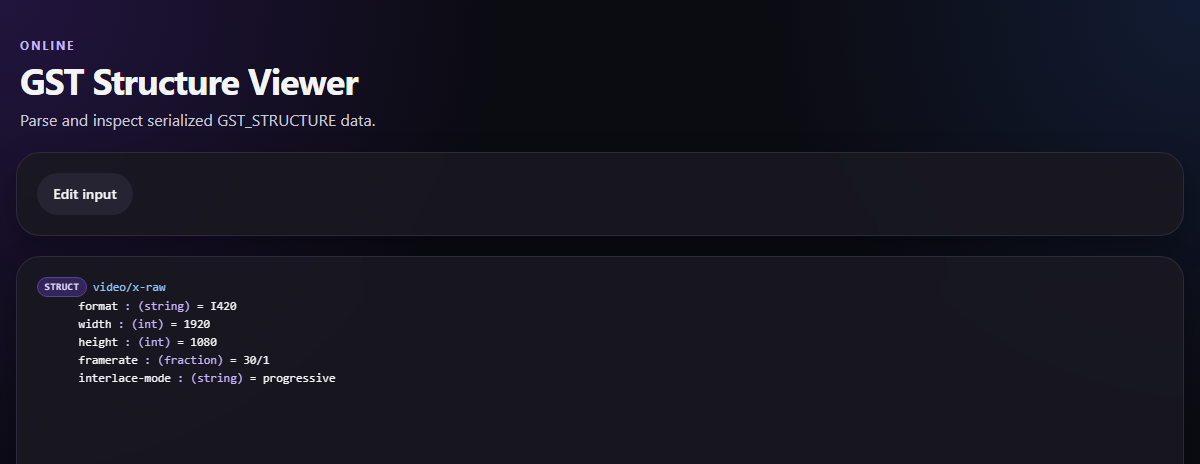
gst-struct-viewer parsing a video/x-raw capability structure
Handling Complex Nested Structures
gst-struct-viewer excels with deeply nested serialized structures, like the one shared in the previous section.
The tool parses the complex nesting and type annotations, letting you explore the hierarchy interactively:
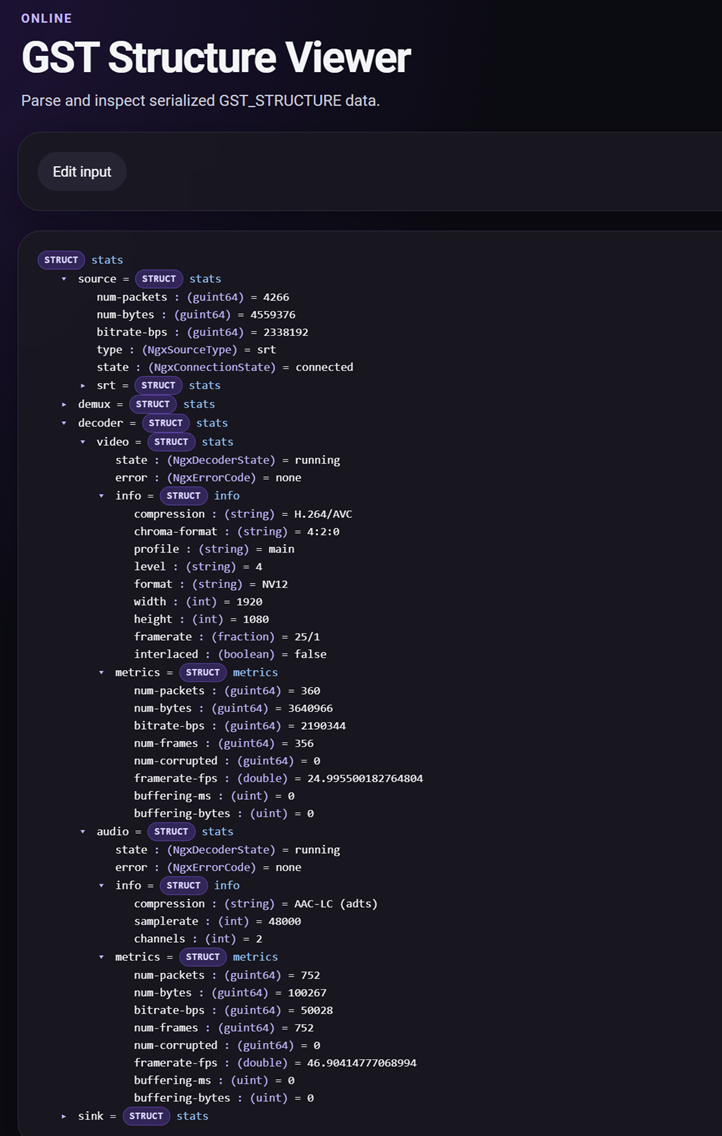
gst-struct-viewer parsing a complex nested structure with multiple type annotations
Why This Matters
As a developer working with GStreamer, you’ve probably spent time debugging pipeline issues, analyzing media capabilities, or reverse-engineering structure formats. Every minute saved on structure parsing is a minute you can spend on what really matters: building great media applications.
Whether you’re:
- Debugging GStreamer applications and need to understand logged structures
- Developing media tools and need to visualize capability negotiation
- Learning GStreamer and want to understand structure format interactively
- Integrating GStreamer into your project and need quick structure analysis
…gst-struct-viewer has you covered.
Key Features
- Smart Parsing: Handles escaped characters, quoted strings, and nested structures automatically
- Type Detection: Distinguishes between integers, fractions, strings, and nested structures
- Progressive Disclosure: Expand only the parts you need to see
- Error Handling: Provides helpful messages when structures can’t be parsed
- No Dependencies: Pure client-side processing—your data never leaves your browser
- Free & Open Source: MIT licensed, available on GitHub
Try It Now
The tool is deployed and ready to use right now: 🔗 gst-struct-viewer online
Technical Details
Built with modern web technologies:
- React 19 - UI framework for interactivity
- TypeScript - Type-safe parsing logic
- Vite - Lightning-fast development and build
- Responsive Design - Works on desktop and mobile
The parser is carefully engineered to handle:
- GStreamer serialization format with type annotations (e.g.,
(string),(int),(MyType)) - Nested structures enclosed in brackets
[...] - Semicolon-delimited nested structure terminators
- Field names and values according to GStreamer’s
GST_STRUCTUREspec - Graceful fallback for edge cases and malformed input
For details on the GST_STRUCTURE serialization format, see the GStreamer documentation.
Community & Contributions
I built this tool to solve a real problem in my GStreamer workflow, and I hope it saves you time too.
If you find it useful, have ideas for improvements, or want to contribute:
📦 GitHub Repository
🐛 Report Issues
📝 Contribute
Get Started Today
Stop spending time manually parsing GStreamer structures. Head over to gst-struct-viewer and try it with your own structure strings.
Have a favorite GST_STRUCTURE that used to confuse you? Paste it in and watch it become instantly clear. Then share your feedback—I’d love to hear how this tool helps your workflow!
Happy GStreaming! 🎬